Fix cards: every AI visibility gap turned into a fix on your real site
Fix cards are what Citeon AI produces after the measurement: for each gap a scan finds, one prioritised change grounded in a live probe of your site, with the evidence, the change, how to make it, a ready prompt, and the file when the fix is a file. On Optimize the files go live in one click and the live site is re-checked afterwards. A chart of the gap is not a plan; the cards are.
- Six to nine cards per scan, each with evidence, change, how, a ready prompt, category, effort and impact; a file when the fix is a file.
- A card that proposes adding what the probe found present is dropped; a schema card that cannot name a real page is dropped; no city but the verified one.
- Visibility: 10 cards a month with the files. Optimize: 30 a month, applied in one click on WordPress, Astro and Next.js.
What a fix card is
A scan tells you that for “best accountant in Rotterdam” ChatGPT names three firms and not you, and read a trade directory and a review site to decide. A fix card is the next sentence: claim this listing, add this answer to this page, allow this crawler, put this markup on that page. It is written from what the scan and the probe found on your site, in your market's language, and it carries a prompt you can paste into your own tools if you prefer to do it your way.
The baseline makes the point: across 7,552 measured answers, the business asked about is named in 35.2% and recommended in 20.6%. Most businesses start from a gap, and the gap has a shape the engines reveal, question by question.
How to win this answer
Every tracked question opens with what to do about it. Four things, computed from the answers already stored, never projected:
| Shown | From |
|---|---|
| Who the engines name instead of you | The brands in the stored answers for this question, per engine |
| Which sources they read, and whether your site is one of them | The citations recorded with each answer |
| The closest page of your site | The page the probe found that best matches the question |
| The actions that cover the gap | The fix cards that apply to this question |
It is on the Visibility and Optimize plans, in the dashboard, for every question you track. The free audit shows the answers; the plans show how to win them.
What is on a card
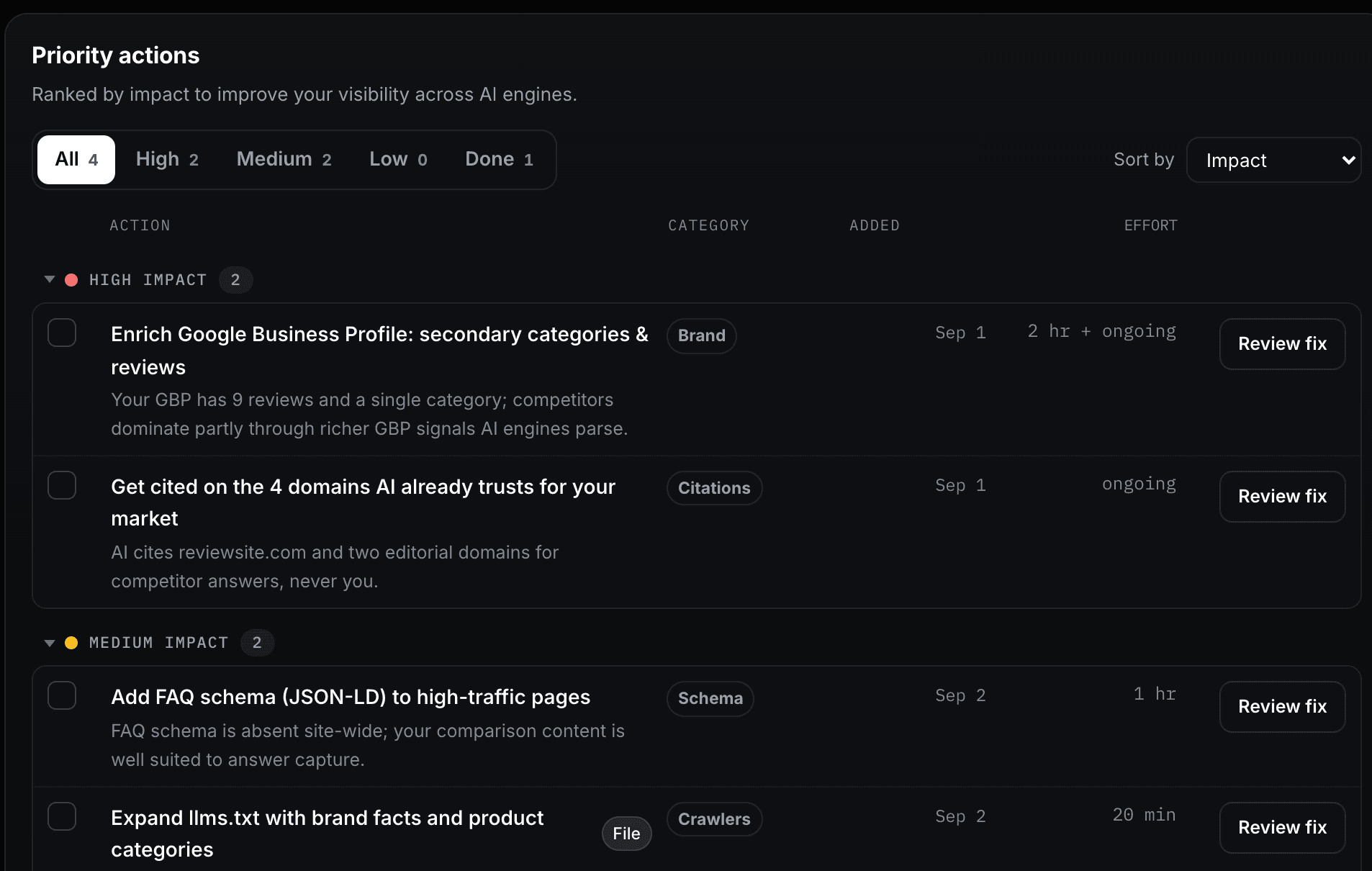
The demo workspace at citeon.ai/portal, sample data, captured on 7 October 2026.
| Field | What it holds |
|---|---|
| Evidence | What the scan or the probe found: the missing markup, the blocked crawler, the question answered by a competitor's page |
| Change | The one thing to change, stated so it can be checked afterwards |
| How | The steps, for the platform your site runs on |
| Prompt | A copy and paste prompt for your own tools, when you would rather do it yourself |
| Category | schema, crawlers, technical, content, citations or brand |
| Effort and impact | An effort such as 5 min, 1 hr, ongoing or auto; an impact of high, medium or low |
| File | For schema, llms.txt and robots.txt cards: the file generated for your site, ready to apply |
Grounded in your real site
The rules that keep a card honest are rules that drop cards. The probe reads the homepage, robots.txt per crawler, llms.txt, the sitemap and up to twelve child sitemaps, the structured data on each kind of page, and the content depth; it detects whether the site runs on WordPress, Astro, Next.js, Shopify, Webflow, Wix, Squarespace or Nuxt, so a card never describes the wrong stack. A card that proposes adding something the probe verified as present is dropped. A schema card has to name a page that exists and was read, or it is dropped. A card never names a city other than the one verified for the business. A Business Profile or review card carries only the impact the local questions justify: when few of your tracked questions are local, it cannot be marked high.
A fix must be checkable on the live site. If it cannot be, it is not a card.
Citeon AI, the card rule
Apply, then verify
| Where your site runs | What one click does |
|---|---|
| WordPress | The Citeon Connect plugin writes the JSON-LD into the head, serves llms.txt, filters robots.txt, and purges LiteSpeed, W3TC, WP Rocket or Super Cache so the change shows at once; deactivating reverts everything |
| Astro, Next.js | The connector packages serve the generated files from the site's own domain, with the site's deploy hook called when it is a static build |
| Anything else | The file is generated for download; the card says where it goes |
After applying, the Verify panel fetches your live site and checks the schema, the llms.txt and the robots rules the card changed, with a link to Google's Rich Results Test. The next daily scan shows whether the engines' answers moved on the question the card was about; that is the measurement that counts.
How many, how often
| Plan | Cards | Applied by |
|---|---|---|
| Visibility, 59 euro a month | 10 a month, with the files | You |
| Optimize, 199 euro a month | 30 a month, with the monthly GEO audit | Citeon AI, one click, with your approval |
A new set is generated when there are no automatic cards yet or the set is older than 14 days; cards you wrote and cards marked done are never touched.
Prices and the rest of each plan: pricing. Where the fixes come from: the daily AI visibility tool and the monthly GEO audit.
Questions people ask
What is a fix card?
One prioritised change to your site or your presence elsewhere, produced from a scan: the evidence the scan found, the change to make, how to make it, a prompt you can paste into your own tools, the category and the impact, and, when the fix is a file, the file itself generated for your site. Six to nine cards per scan, deduplicated, in the language of your market.
How does Citeon AI know the fix applies to my site?
Every scan ends with a light probe of the site: the homepage, robots.txt per crawler, llms.txt, the sitemap and up to twelve child sitemaps, the structured data per kind of page, the content depth, and the platform the site runs on. A card that proposes adding something the probe found present is dropped. A schema card that cannot name a page that exists and was read is dropped. A card never names a city other than the verified one.
What is "How to win this answer"?
Every tracked question opens with what to do: who the engines name instead of you, which sources they read and whether your site is among them, the closest page of your site, and the actions that cover the gap. It is computed from the stored answers, never projected, and it is on the Visibility and Optimize plans.
Do I have to apply the fixes myself?
On Visibility the cards carry the files and the copy; you apply them. On Optimize the generated files go live in one click on WordPress through the Citeon Connect plugin, and on Astro and Next.js through the connectors, with the caches purged so the change shows at once. Fixes that live elsewhere, a listing to claim or a profile to complete, stay yours to do; the card tells you where.
How do I know a fix worked?
Twice. The Verify panel re-checks the live site for the schema, the llms.txt and the robots rules the card changed, with a link to Google's Rich Results Test. Then the daily scan shows whether the engines' answers moved, on the question the card was about.
How often do the cards refresh?
A new set is generated when there are no automatic cards yet or when the set is older than 14 days. Cards you wrote yourself and cards marked done are never touched.
Sources
- Citeon AI, the fix generator (engine, fixgen.py). inputs, categories, impact and effort, the 14 day refresh, the rules that drop a card, as deployed on 7 October 2026
- Citeon AI measurements, 24 August to 7 October 2026. 7,552 answers; the business asked about is named in 35.2% and recommended in 20.6%
- Google, Optimizing your website for generative AI features on Google Search. no special files or markup required; crawlable, non-commodity content